Group coaching
Tag a Pulse contact group (or challenge) as well as #client. PulseKit syncs it as a Group or Challenge client. Use the Client type filter on the client list to see them.
Programme buckets
Programme buckets match new group clients to a programme using their answers. Existing clients keep their assigned programme.
- On each programme a group client may receive, turn on Available for programme buckets.
- In Settings > Programme buckets, choose Where clients answer: PulseKit app or Pulse onboarding form.
- Add questions or link Pulse contact fields, then add mapping rules. The first matching rule wins.
- Select Save flow.
With PulseKit app, a new group client who has no programme answers your questions when they open their app. You can set a fallback programme for answers that match no rule.
With Pulse onboarding form, edit your existing form in Pulse. Use Open Pulse form builder to reach the correct account. Link the form's contact fields and enter the answer values they save. Single-choice and radio fields import their choices for a new blank question. Text fields need explicit values; PulseKit does not guess from free text.
Clients answer the Pulse form once. PulseKit reads the saved values when the client enters your client pipeline, or when answers arrive later. All mapped fields need a valid answer, including fields set to Any mapped answer in a rule. Missing, unmapped or unmatched answers wait for you to choose a programme. There is no fallback in this mode. The client can still use their other app tabs while they wait, and you see a Programme needs assignment notification.
Your group onboarding workflow must add the group tag before it moves the contact into your client pipeline. The existing #client tag and pipeline handoff remain required.
When a rule matches, PulseKit assigns the programme, schedules the sessions and notifies you. A resubmission does not replace any past or current assignment. If you rename an answer value in Pulse, update its mapping here.
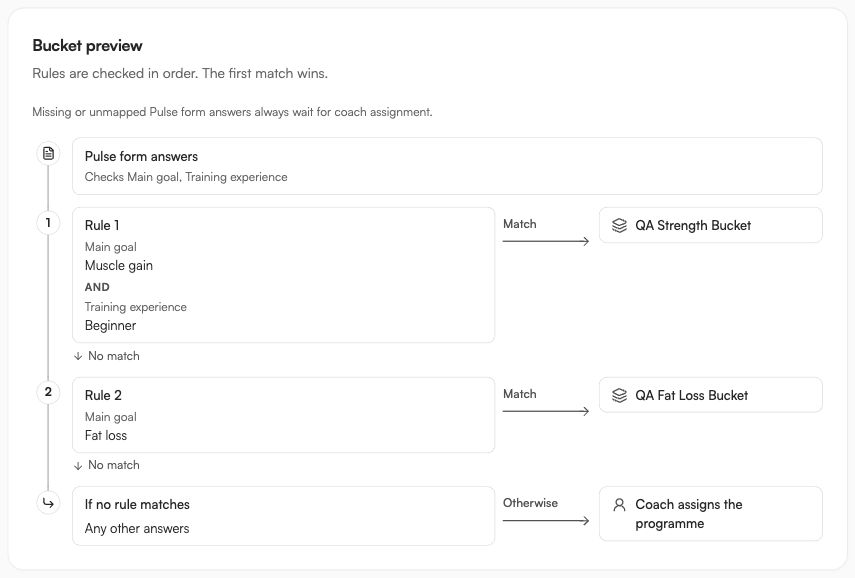
The Bucket preview connects each answer combination to a programme. Follow the numbered rules in order: a match goes to the programme, and no match continues to the next rule. Dashed paths warn when an earlier rule hides a later rule. It updates as you edit. Clients use the saved rules until you select Save flow.
Default programme and group clients
- With PulseKit app, if your saved flow has questions and an available programme marked for buckets, new group clients see the questions first. They do not get your default programme automatically.
- With PulseKit app, if you have no usable question flow, new group clients get your default programme, the same as 1:1 clients. An empty flow or a flow with no available programme is not used.
- A client who already has a programme does not see the questions. PulseKit does not remove existing programmes.
- With Pulse onboarding form, new group clients wait for their mapped answers or for you to assign a programme. They do not receive the default programme. Your 1:1 onboarding is unchanged.
Check-ins and community
Group clients use your default check-in form unless you customise a client's questions. See Settings.
If you add a community link, group clients also see Check in with community on the Check-in tab. See Community link.
For reviewed posts, connect a community channel and enable sharing in Brand identity. After submitting a private check-in, clients can choose individual answers to share, review the post and approve it themselves. They can also skip sharing. Nothing is selected by default. They must already belong to that channel. See Reviewed community posts.